Feedback Module
Feedback is where members report bugs, request features, and take the app's usability survey — feeding directly back to the developer.
Submitting a Bug Report or Feature Request
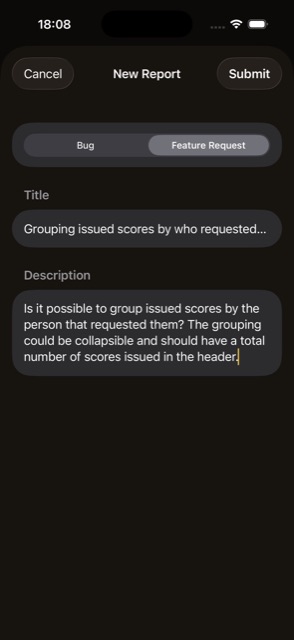
- + button — Type (Bug or Feature Request), Title (required), Description, an optional screenshot from your photo library, then Submit. Your device's OS version is attached automatically.
- Active reports — listed under Bugs / Feature Requests headings; a collapsed “Resolved (N)” group holds anything already closed out.
- Tap a report — opens its detail screen.
- Withdraw your own report — swipe to delete, but only while it's still “Open.”
Viewing & Managing Reports
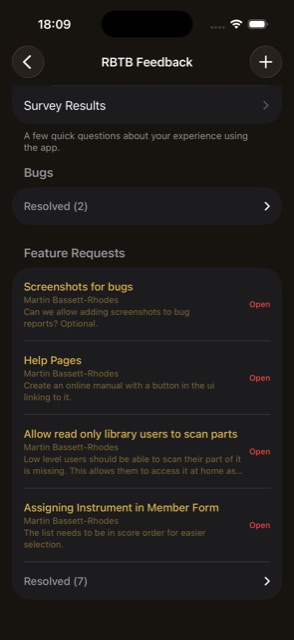
- Change Status (Open / In Progress / Resolved), edit Notes, Save. Full access only
- OS version and attached screenshot — shown here for triage, when the reporter included them.
- Delete any report, at any time. Full access only
- Survey Results link — from the Feedback list. Full access only
- Reporter names — hidden from anyone without Full access, so ordinary members only ever see their own reports identified.
The Usability Survey
Reached from the “Take Our Survey” button on the Feedback list.
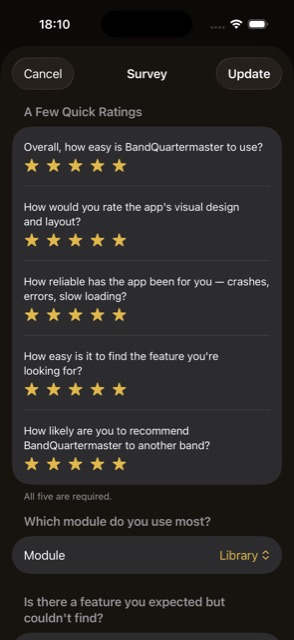
- Five required star ratings — ease of use, design, reliability, findability, and would-recommend.
- “Which module do you use most?” picker.
- Three optional free-text questions — missing feature, most useful feature, and additional comments.
- Submit / Update — re-opening the survey after you've already submitted pre-fills your previous answers and the button changes to “Update.”
Survey Results
Full access only.
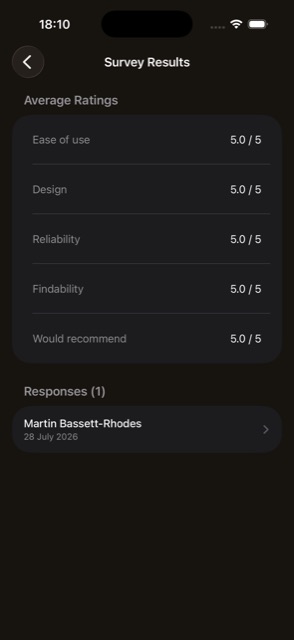
- Average of the five star ratings across the organisation's responses.
- Individual responses — listed by name and date, drilling into full detail.